Search Results
TUCSON, AZ (Dec. 7, 2016) — More than three decades ago, Rain Bird pioneered remote irrigation system access with the development of the Maxi III System for golf courses. Now, Rain Bird has made remote access and control available for residential and...
TUCSON, AZ (January 4, 2017) – The National Business Research Institute (NBRI) is pleased to confer the distinction of Employee Excellence upon Rain Bird Corporation and welcomes them to the NBRI Circle of Excellence for the second year in a row...
TUCSON, AZ. (Dec. 7, 2016) —Since its drought made headlines in 2015, the state of California has introduced various mandates to help conserve water. Recently, the state introduced a new mandate against irrigating for 48 hours after a rainfall of one...
AZUSA, Calif. (Sept. 7, 2016) — Rain Bird’s 32ETI Easy to Install Automatic Sprinkler System Kit was recently named the top product in Ezvid Wiki’s list of the eight best lawn sprinklers for 2016. The lawn sprinkler video wiki can be viewed at https...
AZUSA, CA (Oct 26, 2016) – Over the past nine years, the highly visible grassy areas along the National Mall in Washington, D.C., have been undergoing renovation to help reverse the impact caused by up to 3,000 permitted events and 33 million...
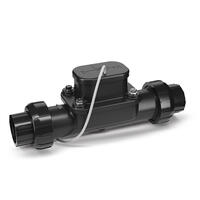
Help protect your customers’ property and landscape with the FG100 Flow Sensor. Designed for residential and smaller commercial applications, the FG100 monitors irrigation and instantly identifies when there is a leak or line break so it can be...
Response Received
Thank You! Our team will be in touch within 24-48 hours to ensure we provide you with a sample that is customized for your specific crop application.
Smart Irrigation Grounds News - Mar/April 2021
March/April 2021 Smart Irrigation Grounds News
2024 Select Contractor Business Meeting
To Register for the 2024 Select Contractor Business Conference, please login to the Select Contractor page: www.rainbird.com/rewards We are looking forward to seeing you soon! Return to conference homepage
Eighteen college and university students have been named recipients of the Irrigation Association’s Anthony W. “Tony” LaFetra Scholarship Program. Rain Bird Corporation, a privately held global manufacturer and provider of irrigation products and...
Offer Only Valid in U.S. and Canada
Sorry, this offer is only valid in the US and Canada. Please contact your local Rain Bird Golf Distributor to learn about promotions in your market. Find Golf Distributors
CirrusPRO New Features Guide
CirrusPRO™ New Features Guide March 16, 2026 Version 4.11 Soil Data Last Station Adjustment 952LT Rotor Data October 29, 2025 Version 4.10 Daily Water Usage Report Maximum ET User Levels Information Section Improved "Table Edit" in the Stations section Tooltip adjustments in the Programs screen July 1, 2025 Version 4.9 Add Stations to a Program from the Map Station Adjust Override Pump Carousel in Active Graph Separate Axis for Pump Pressure Ability to Select Pump to be Displayed in Quick Access Menu Ability to add a Stop Time to a Program Ability to Search ICM Addresses Ability to find Unassigned...
CirrusPRO Release 4.1.995.X
New Features Version: 4.1.995.X July 8th, 2022 How-To Videos link This feature enables the user to access a series of How-To videos directly from within CirrusPRO. This link is available by clicking on the Profile icon in the top right corner from a large tablet or a PC: Or by hitting the “Menu” icon on the top left of your phone view and then by hitting your username under “CirrusPRO” to access the Profile section menu: Flow Manager on Mobile device It is now possible to view information related to Flo-Manager™ on mobile devices with smaller displays. As an example...
CirrusPRO Release 4.1.1106.X
New Features Version: 4.1.1106.X August 18th, 2022 Station Diagnostic When on the map, simply select a station by clicking on it. From the pop-up menu, select “Station Diagnostic” A new window will open and display the historical results for Status Polls on that station. In the example below, we can see that it did not pass that test twice on June 15th 2021. From this screen, you can run a status poll by clicking on “Run Test” in the top right corner. You can also select the “ICM Voltage” test from this drop down. In this example, the station was...
CirrusPRO Release 4.2.22.X
New Features Version: 4.2.22.X December 8, 2022 Multi-Select Tool for Map Operations This feature enables the user to select multiple stations from the map to perform various operations, such as start, stop, pause, and resume. To select multiple stations from the map, simply click on the “Multiselect” button and then select the stations you would like to control. The selected stations will display a white circle around them. You can select as many stations as wanted, and this from wherever on the map. Upon selecting stations, a small badge next to the tool will display the number of selected stations...
CirrusPRO Utilities & Troubleshooting
Utilities & Troubleshooting Restoring Remote Access After Software Update {"preview_thumbnail":"/sites/default/files/styles/video_embed_wysiwyg_preview/public/video_thumbnails/su7nZbYRNT0.jpg?itok=ONE0TR7E","video_url":"https://youtu.be/su7nZbYRNT0","settings":{"responsive":true,"width":"854","height":"480","autoplay":false},"settings_summary":["Embedded Video (Responsive)."]} How to manually backup and restore your database {"preview_thumbnail":"/sites/default/files/styles/video_embed_wysiwyg_preview/public/video_thumbnails/_t9tTnVYdwo.jpg?itok=GDbQVCWY","video_url":"https://youtu.be/_t9tTnVYdwo","settings":{"responsive":true,"width":"854","height":"480","autoplay":false},"settings_summary":["Embedded Video (Responsive)."]} How to Reprogram Fast Connect Addresses for an ICM {"preview_thumbnail":"/sites/default/files/styles/video_embed_wysiwyg_preview/public/video_thumbnails/QczFbHTqbBU.jpg?itok=bvSTXV-x","video_url":"https://youtu.be/QczFbHTqbBU","settings":{"responsive":true,"width":"854","height":"480","autoplay":false},"settings_summary":["Embedded Video (Responsive)."]} How to Reprogram Fast Connect Addresses for a Wire Path {"preview_thumbnail":"/sites/default/files/styles/video_embed_wysiwyg_preview/public/video_thumbnails/qoUN3PHHVWI.jpg?itok=ri05Tgfe","video_url":"https://youtu.be/qoUN3PHHVWI","settings":{"responsive":true,"width":"854","height":"480","autoplay":false},"settings_summary":["Embedded Video (Responsive)."]} IC Diagnostics - Initial Setup {"preview_thumbnail":"/sites/default/files/styles/video_embed_wysiwyg_preview/public/video_thumbnails/Gqt_gaTfhFs.jpg?itok=DQl9CpCg","video_url":"https://youtu.be/Gqt_gaTfhFs","settings":{"responsive":true,"width":"854","height":"480","autoplay":false},"settings_summary":["Embedded Video (Responsive)."]} IC Diagnostics - ICM Voltage Test {"preview_thumbnail":"/sites/default/files/styles/video_embed_wysiwyg_preview/public/video_thumbnails/iw2Pax30dDo.jpg?itok=uUEZAtBG","video_url":"https://youtu.be/iw2Pax30dDo","settings":{"responsive":true,"width":"854","height":"480","autoplay":false},"settings_summary":["Embedded Video (Responsive)."]} IC Diagnostics - ICM Status Poll {"preview_thumbnail":"/sites/default/files/styles/video_embed_wysiwyg_preview/public/video_thumbnails/z9RmMtN8BpY.jpg?itok=v7HSmeKm","video_url":"https://youtu.be/z9RmMtN8BpY","settings":{"responsive":true,"width":"854","height":"480","autoplay":false},"settings_summary":["Embedded Video (Responsive)."]} IC Diagnostics - Quick Check {"preview_thumbnail":"/sites/default/files/styles/video_embed_wysiwyg_preview/public/video_thumbnails/9H5tX4XnpYc.jpg?itok=qR5YBUg3","video_url":"https://youtu.be/9H5tX4XnpYc","settings":{"responsive":true,"width":"854","height":"480","autoplay":false},"settings_summary":["Embedded Video (Responsive)."]} Finding ICMs by Address {"preview_thumbnail":"/sites/default/files/styles/video_embed_wysiwyg_preview/public/video_thumbnails/6BlUUReJrQ4.jpg?itok=z8XTJMHz","video_url":"https://youtu.be/6BlUUReJrQ4","settings":{"responsive":1,"width":"854","height":"480","autoplay":0},"settings_summary":["Embedded Video (Responsive)."]}
CirrusPRO Mapping and Map Operation
Mapping and Map Operation Adding Stations and Areas to your Map {"preview_thumbnail":"/sites/default/files/styles/video_embed_wysiwyg_preview/public/video_thumbnails/BIhjhe-8oZA.jpg?itok=IpgV2qaq","video_url":"https://youtu.be/BIhjhe-8oZA","settings":{"responsive":true,"width":"854","height":"480","autoplay":false},"settings_summary":["Embedded Video (Responsive)."]} Multi-Station Select {"preview_thumbnail":"/sites/default/files/styles/video_embed_wysiwyg_preview/public/video_thumbnails/mwAPXW-g3DU.jpg?itok=O8jzMFkq","video_url":"https://youtu.be/mwAPXW-g3DU","settings":{"responsive":true,"width":"854","height":"480","autoplay":false},"settings_summary":["Embedded Video (Responsive)."]} Map Menu Station Icons {"preview_thumbnail":"/sites/default/files/styles/video_embed_wysiwyg_preview/public/video_thumbnails/SrJV1fNhU8w.jpg?itok=RuUKhaUp","video_url":"https://youtu.be/SrJV1fNhU8w","settings":{"responsive":true,"width":"854","height":"480","autoplay":false},"settings_summary":["Embedded Video (Responsive)."]} Notes Icon {"preview_thumbnail":"/sites/default/files/styles/video_embed_wysiwyg_preview/public/video_thumbnails/B2Q6yxrhV6s.jpg?itok=9jziEg5Q","video_url":"https://youtu.be/B2Q6yxrhV6s","settings":{"responsive":true,"width":"854","height":"480","autoplay":false},"settings_summary":["Embedded Video (Responsive)."]} Programs & Schedules Icon {"preview_thumbnail":"/sites/default/files/styles/video_embed_wysiwyg_preview/public/video_thumbnails/6V9P84yOSb8.jpg?itok=daYWCSwJ","video_url":"https://youtu.be/6V9P84yOSb8","settings":{"responsive":true,"width":"854","height":"480","autoplay":false},"settings_summary":["Embedded Video (Responsive)."]} Flo Manager in Map Menu {"preview_thumbnail":"/sites/default/files/styles/video_embed_wysiwyg_preview/public/video_thumbnails/MmA_oFsykPk.jpg?itok=7xbYWOc4","video_url":"https://youtu.be/MmA_oFsykPk","settings":{"responsive":true,"width":"854","height":"480","autoplay":false},"settings_summary":["Embedded Video (Responsive)."]} Imported Layers in Map Menu {"preview_thumbnail":"/sites/default/files/styles/video_embed_wysiwyg_preview/public/video_thumbnails/qW4TptJpaSU.jpg?itok=6smYFZ-h","video_url":"https://youtu.be/qW4TptJpaSU","settings":{"responsive":true,"width":"854","height":"480","autoplay":false},"settings_summary":["Embedded Video (Responsive)."]} Map Menu Importing Image Files {"preview_thumbnail":"/sites/default/files/styles/video_embed_wysiwyg_preview/public/video_thumbnails/-xfA-5n_dAo.jpg?itok=ZlOkn5l6","video_url":"https://youtu.be/-xfA-5n_dAo","settings":{"responsive":true,"width":"854","height":"480","autoplay":false},"settings_summary":["Embedded Video (Responsive)."]} Changing Background Imagery Provider {"preview_thumbnail":"/sites/default/files/styles/video_embed_wysiwyg_preview/public/video_thumbnails/26GqaD1Sxj0.jpg?itok=jWgCFBmH","video_url":"https://youtu.be/26GqaD1Sxj0","settings":{"responsive":1,"width":"854","height":"480","autoplay":0},"settings_summary":["Embedded Video (Responsive)."]} Creating Notes {"preview_thumbnail":"/sites/default/files/styles/video_embed_wysiwyg_preview/public/video_thumbnails/1psh_AUfDWg.jpg?itok=xhm4nqkG","video_url":"https://youtu.be/1psh_AUfDWg","settings":{"responsive":true,"width":"854","height":"480","autoplay":false},"settings_summary":["Embedded Video (Responsive)."]} Creating a Program from the Map {"preview_thumbnail":"/sites/default/files/styles/video_embed_wysiwyg_preview/public/video_thumbnails/0tvdoEGyX9k.jpg?itok=LPSYtXL2","video_url":"https://youtu.be/0tvdoEGyX9k","settings":{"responsive":1,"width":"854","height":"480","autoplay":0},"settings_summary":["Embedded Video (Responsive)."]} Adding Stations to an Existing Program {"preview_thumbnail":"/sites/default/files/styles/video_embed_wysiwyg_preview/public/video_thumbnails/afoHD-Bf4NE.jpg?itok=JKbgO9y_","video_url":"https://youtu.be/afoHD-Bf4NE","settings":{"responsive":1,"width":"854","height":"480","autoplay":0},"settings_summary":["Embedded Video (Responsive)."]}